
How to Use Captain Mobile App for Table Ordering and Cash Custody Policy
The Innoventry Captain Mobile App turns standard Android smartphones and handheld POS terminals into powerful order-taking tools. Service captains and waiters can take orders at guest tables, fire tickets instantly to kitchen printers, and move guests across tables without running back and forth to the central billing counter.
1. Connecting the Captain App
The Captain App connects directly to your Innoventry POS server over your restaurant's local Wi-Fi network:
- Ensure your Android device is connected to the restaurant's local Wi-Fi router.
- Open the Captain App and enter the local IP address of your main Innoventry POS computer (or scan the pairing QR code from the desktop software).
- Log in using the assigned Captain or Steward credentials.
2. Mobile Floor Plan & Section Navigation
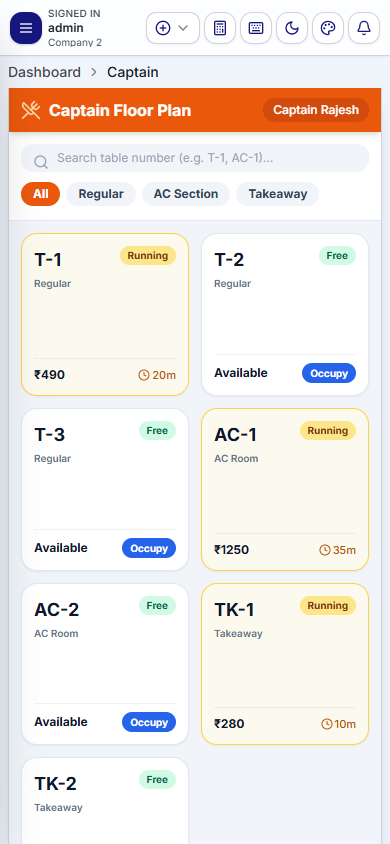
Upon login, the Captain App presents an intuitive, touch-optimized floor plan:
- Section Chips: Tap filter chips at the top to toggle between dining zones: All, Ground Floor Non-AC, 1st Floor AC, Rooftop, and Garden.
- Table Status Cards: View table numbers, guest covers, elapsed time, and total bill amounts for occupied tables at a glance.
3. Table-Side Order Taking & KOT Dispatch
To take an order from guests seated at a table:
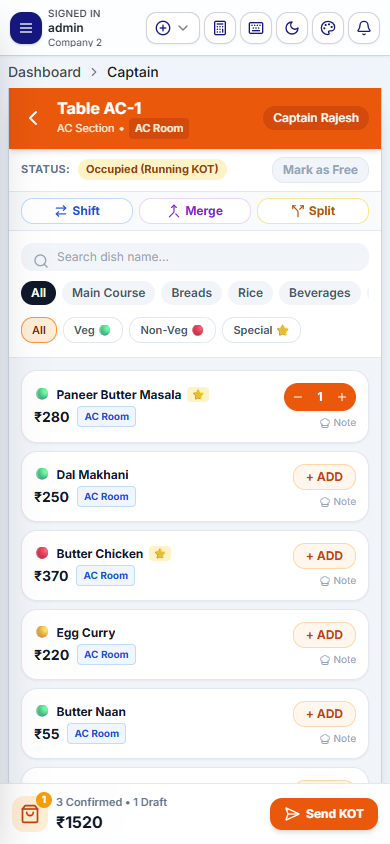
- Tap on an available or running table card.
- Browse categories (Starters, Main Course, Breads, Beverages) or use the quick search bar.
- Clear dietary badges (Green dot for Veg, Red dot for Non-Veg) prevent service errors.
- Tap items to add portions. The applicable 3-tier price (Regular, AC, or Takeaway) is selected automatically based on the table's section.
- Add cooking instructions (e.g., "Extra Gravy", "Make Mild").
- Tap Send to Kitchen (Fire KOT). Kitchen thermal printers receive the order instantly.
4. Mobile Table Shift and Bill Split
Captains can handle table operations directly from the floor:
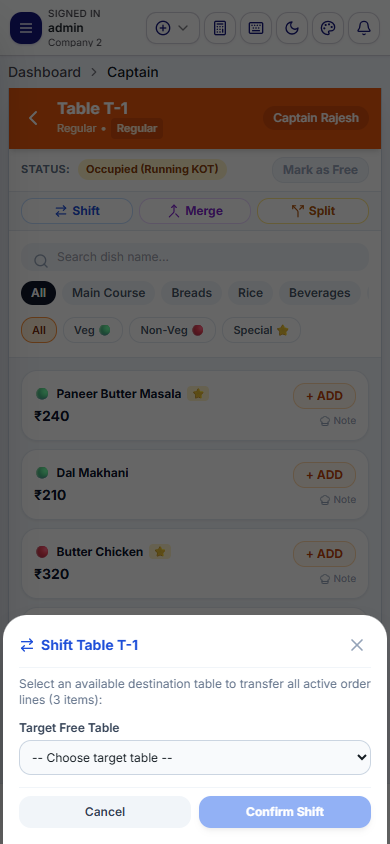
- Shift Table: When guests move from one table to another, tap the menu options on the running table, select Shift Table, pick the new destination table, and confirm. All items and running amounts transfer immediately.
- Bill Split: If guests ask for split bills, the captain can configure an equal split by guest count or an item-wise partition right on the mobile device.
5. Strict Cash Custody Policy: Zero Floor Leakage
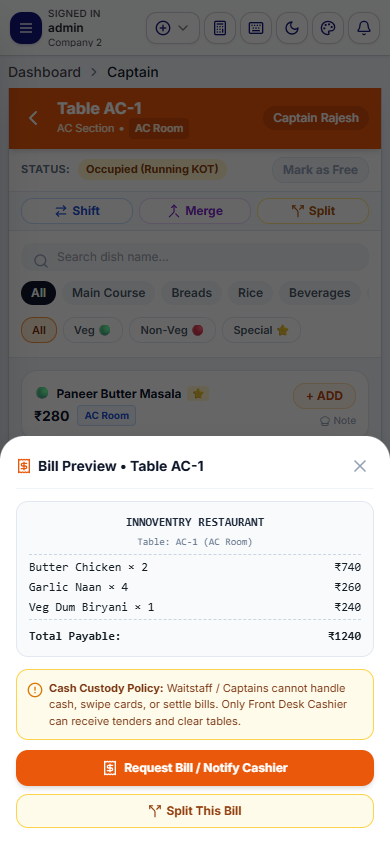
One of the most critical operational controls in Innoventry is the Cash Custody Separation Policy. By design, the Captain Mobile App strictly forbids captains and floor waiters from settling bills or collecting cash.
Why is Cash Settlement Restricted for Captains?
- Preventing Revenue Leakage: In high-volume dining environments, allowing floor staff to collect cash often results in pocketing unrecorded cash, applying manual unauthorized discounts, or canceling items after guests pay.
- Audit Integrity: Centralizing payment collection at the counter cashier ensures that cash drawer balances match physical counts exactly at end-of-shift reconciliation.
- Customer Transparency: Guests receive official tax invoices generated directly from the central cashier system with BharatQR or printed GST details, rather than handwritten or provisional slips.
The Standard Operating Procedure (SOP)
- The guest finishes dining and requests the check.
- The Captain taps Print Pre-Bill / Guest Check on the mobile app. A provisional review receipt prints so the customer can verify the items.
- The customer visits the billing counter, or the cashier visits the table with the wireless card terminal/BharatQR scanner to collect payment.
- The cashier settles the bill on the central POS terminal, prints the official tax invoice, and opens the cash drawer.