
Skip to content
Innoventry
Official Google Play Store Apps

Innoventry On The Go: Powerful Mobile Apps

Whether managing restaurant tables, reviewing debtor balances in client meetings, or issuing GST invoices from your phone, our three dedicated Android applications give you unmatched mobility with zero data loss.

Innoventry Mobile ERP Icon
Primary Business ERP

Innoventry Mobile ERP

Complete GST Billing, Accounting & Stock Management on your Phone

The primary Innoventry Android app for small and medium businesses. Create GST invoices, track multi-godown inventory, manage ledgers, and view real-time financial reports on the go.

Innoventry Restaurant Icon
Restaurant Captain POS

Innoventry Restaurant

High-Speed Mobile Table Ordering, Dynamic Pricing & Kitchen KOT Dispatch

Purpose-built mobile POS for restaurant captains and waitstaff. Take table orders, apply 3-tier section pricing, dispatch kitchen KOTs to thermal printers, and enforce strict cashier cash custody.

Innoventry Outstandings Icon
Executive Snapshot App

Innoventry Outstandings

Instant Read-Only Financial Snapshot & Stock Checker via QR Code

A secure companion app allowing desktop users to create an instant snapshot of debtor outstandings, party ledgers, and live stock on mobile via a simple QR code scan.

Innoventry Mobile ERP Icon
Primary Business ERPin.innoventry.app.innoventry

Innoventry Mobile ERP

Complete GST Billing, Accounting & Stock Management on your Phone

About This Application

Innoventry Mobile is the full-featured companion app to Innoventry Desktop ERP. Engineered for retailers, wholesalers, distributors, and service providers, it puts complete business administration in your pocket. Seamlessly syncs with Windows Desktop and Cloud Web editions.

Best Suited For:Business owners, retailers, wholesalers, accountants, and field sales teams

Key Highlights

  • Instant GST Billing, Quotations & Delivery Challans
  • Double-Entry Accounting, Day Book & Trial Balance
  • Multi-Warehouse Inventory & Barcode Scanning
  • Dynamic UPI QR Codes & Instant WhatsApp Sharing
  • Seamless Multi-Device Sync with Desktop & Web

App Screenshots & Workflows

5 Screens
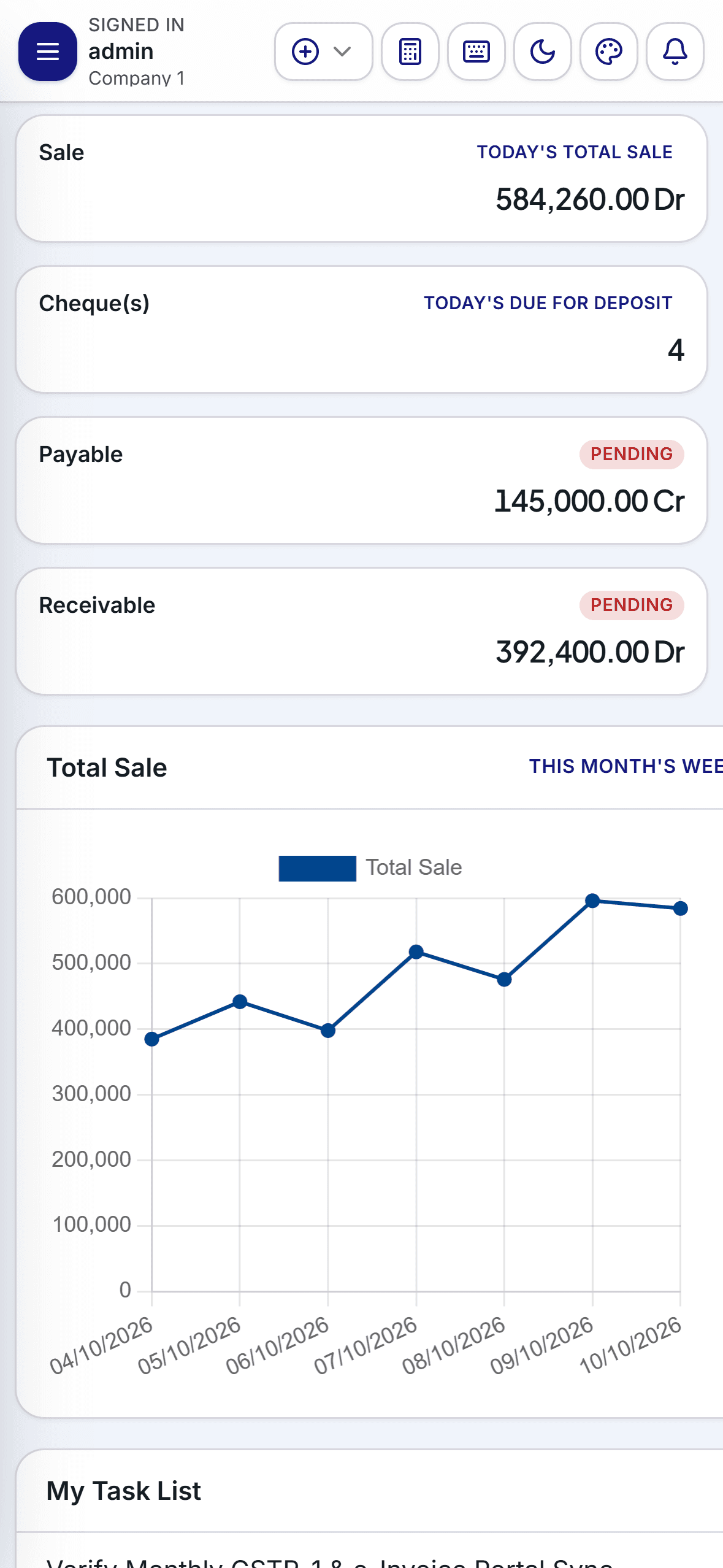
Innoventry Mobile Dashboard

Executive Dashboard with Live Revenue, Cash Flow & Sales KPIs
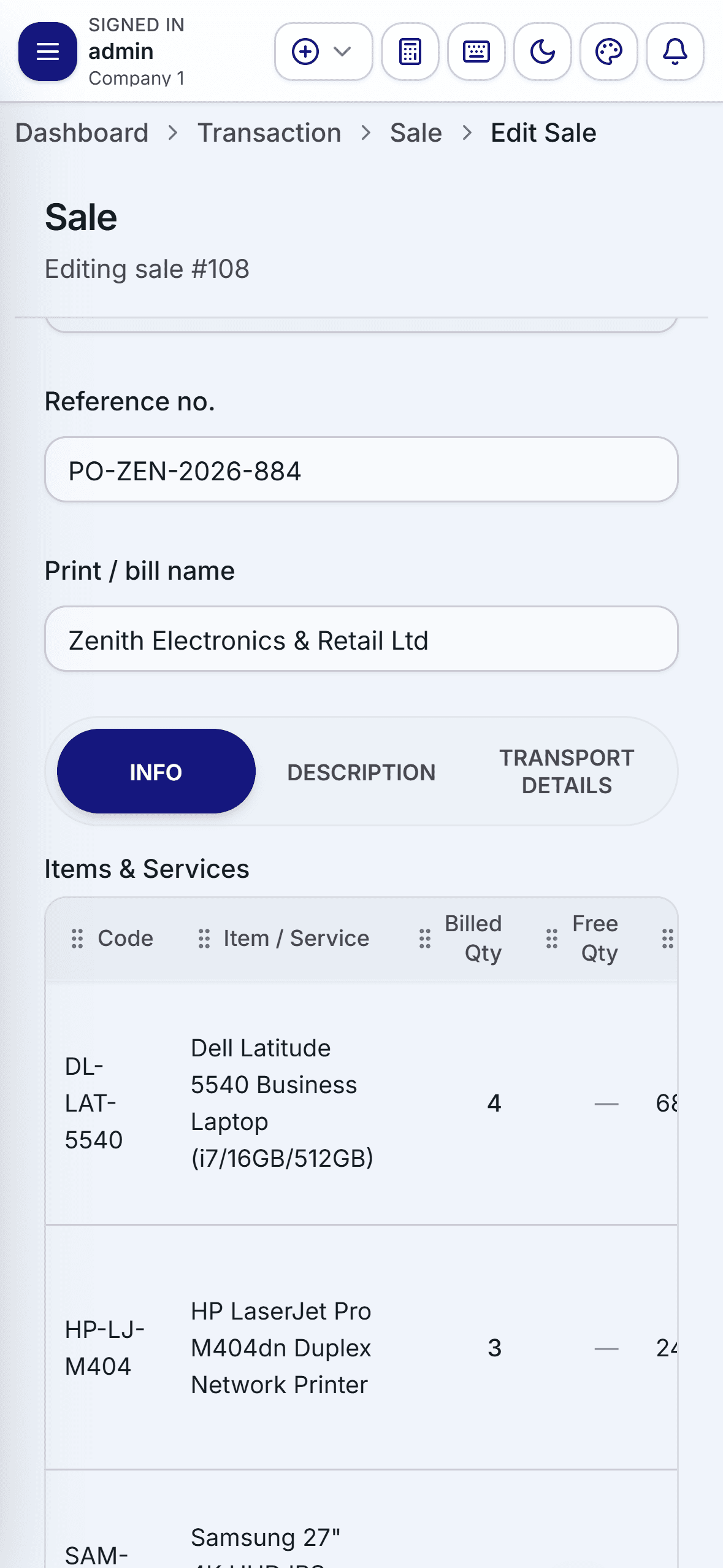
Mobile GST Billing Screen

Fast GST Invoice Creation with Instant Tax & Discount Calculation
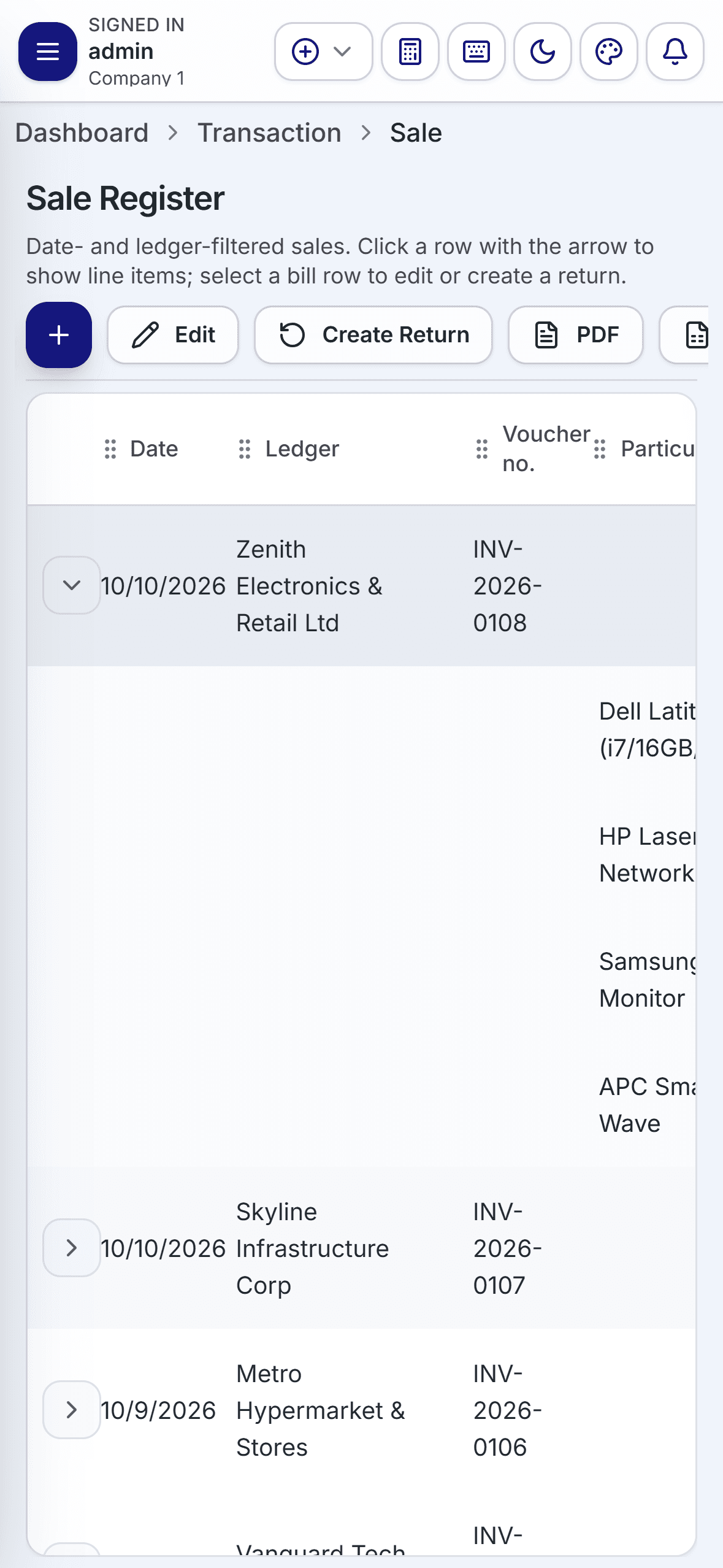
Mobile Sales Register

Sales Register with Filterable Date Ranges & Payment Modes
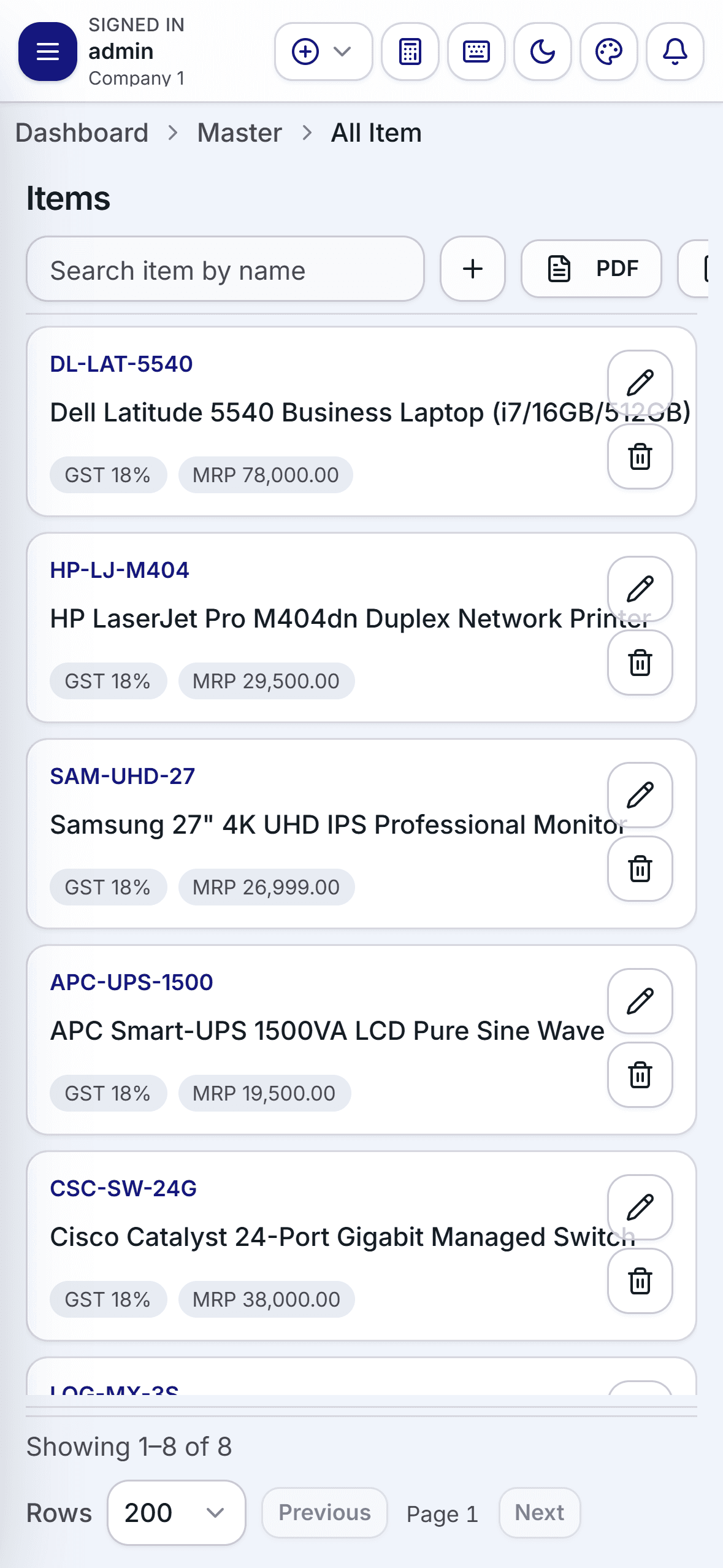
Mobile Inventory Catalog

Stock Catalog with Real-Time Godown Quantities & Pricing Tiers
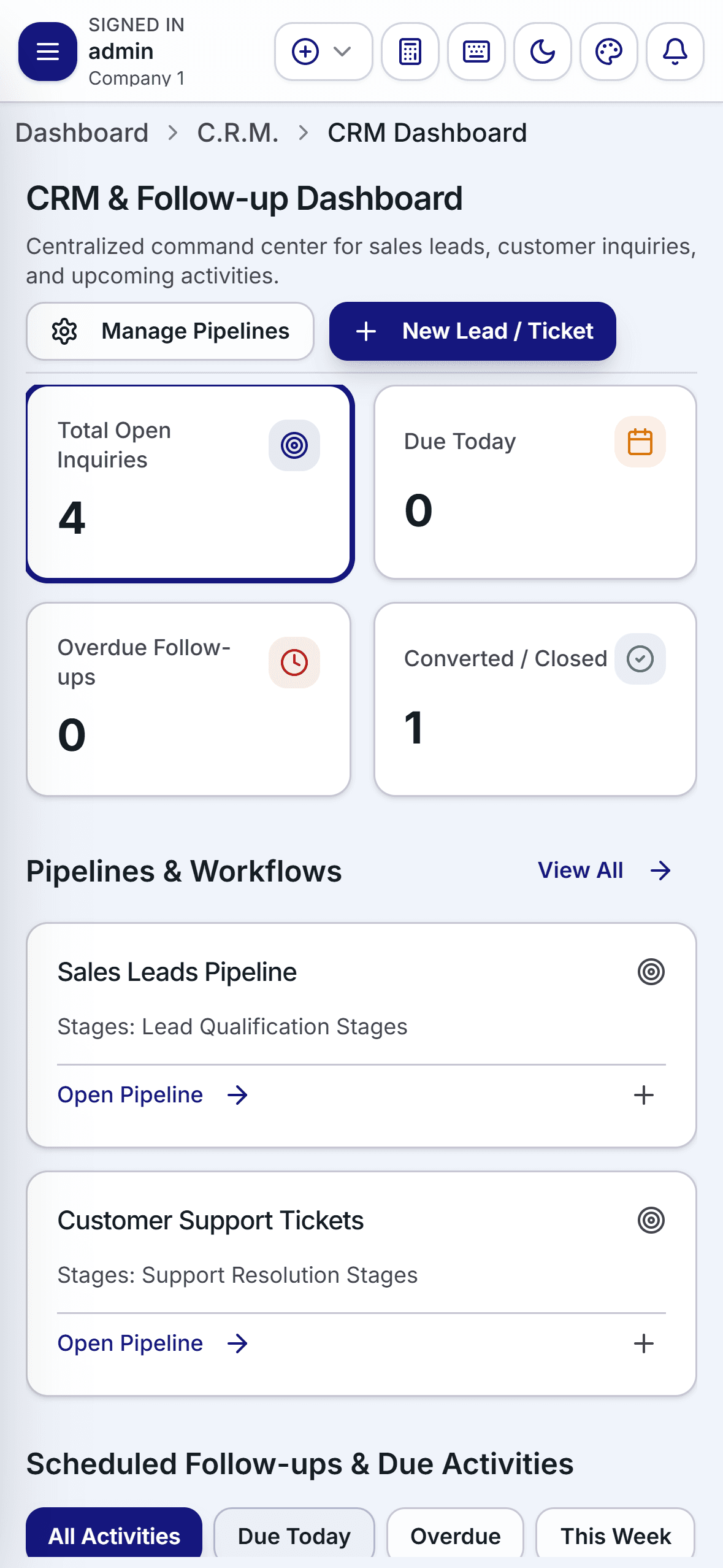
Mobile CRM Lead Tracker

CRM Tracker for Customer Follow-Ups, Service Inquiries & Leads

Core Capabilities & Features

GST Billing & Invoicing

Sub-Second Invoicing

Generate tax invoices, sales receipts, and delivery notes in seconds with automatic CGST, SGST, and IGST calculation.

WhatsApp & Email Dispatch

Share professional PDF invoices with clickable UPI payment links directly to customers via WhatsApp and email.

Quotes & Orders Workflow

Draft sales quotations and purchase orders in the field and convert them to tax invoices with 1 click.

Multi-Rate Tax Support

Handles mixed tax rates, cess, trade discounts, and round-offs compliant with current Indian GST laws.

Inventory & Stock Control

Multi-Godown Tracking

Monitor live inventory across multiple warehouses, retail counters, and stock locations from your phone.

Batch & Barcode Support

Scan product barcodes using your mobile camera. Track batch numbers, manufacturing dates, and expiry dates.

Low Stock & Understock Alerts

Receive timely alerts when items fall below reorder thresholds to prevent stockouts and missed sales.

Stock Taking & Adjustments

Perform physical stock audits in your warehouse using your phone and log reconciliation adjustments instantly.

Accounting & Financial Reports

Daily Day Book & Ledgers

Inspect cash book, bank accounts, customer balances, and supplier ledgers with running debit/credit totals.

Profit & Loss and Balance Sheet

Review monthly profitability, expenses, revenue trends, and balance sheets generated automatically.

GST Return Readiness

View GSTR-1 and GSTR-3B monthly summaries and export clean data formatted for direct CA review and Tally.

Bank Reconciliation

Keep track of cleared cheques, RTGS/NEFT transfers, and bank statements without manual paper ledgers.

How to Get Started

1

Download & Log In

Install the app from Google Play Store and sign in with your Innoventry business account.

2

Live Cloud & LAN Sync

All item masters, customer ledgers, and pricing tiers sync automatically with your desktop and cloud database.

3

Bill & Transact Anywhere

Create invoices, collect UPI payments, check stock, and dispatch delivery orders whether in the office or on the road.
Innoventry Restaurant Icon
Restaurant Captain POSin.innoventry.app.restaurant

Innoventry Restaurant

High-Speed Mobile Table Ordering, Dynamic Pricing & Kitchen KOT Dispatch

About This Application

Innoventry Restaurant Captain App empowers hospitality teams to take dining orders directly at the table. Features interactive multi-section floor plans, real-time KOT routing to kitchen printers, preset cooking modifiers, table shifting/merging, mandatory cancellation audits, and offline Wi-Fi resilience.

Best Suited For:Restaurant captains, waiters, fine-dine outlets, cafes, bars, food courts, and QSRs

Key Highlights

  • Interactive Multi-Zone Floor Plan (AC, Non-AC, Rooftop, Takeaway)
  • 3-Tier Dynamic Pricing Matrix (Automatic Section-Based Rates)
  • Multi-Station Thermal KOT Dispatch (Kitchen, Tandoor, Bar)
  • Preset Cooking Modifiers (Jain, Spice Levels, Allergy Notes)
  • Strict Cashier Cash Custody Guard & Cancellation Audits

App Screenshots & Workflows

6 Screens
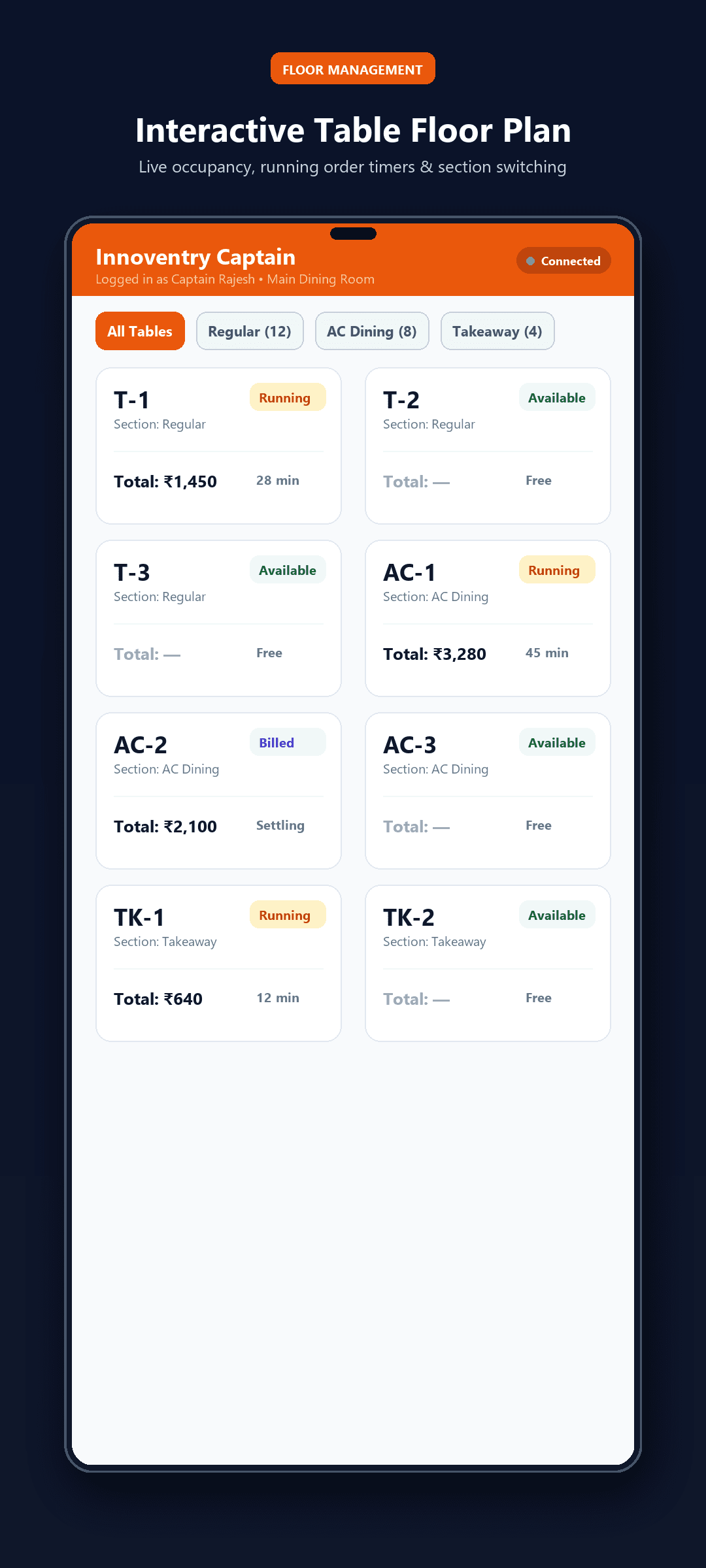
Innoventry Restaurant Floor Plan

Interactive Section Floor Plan with Real-Time Table Occupancy Status

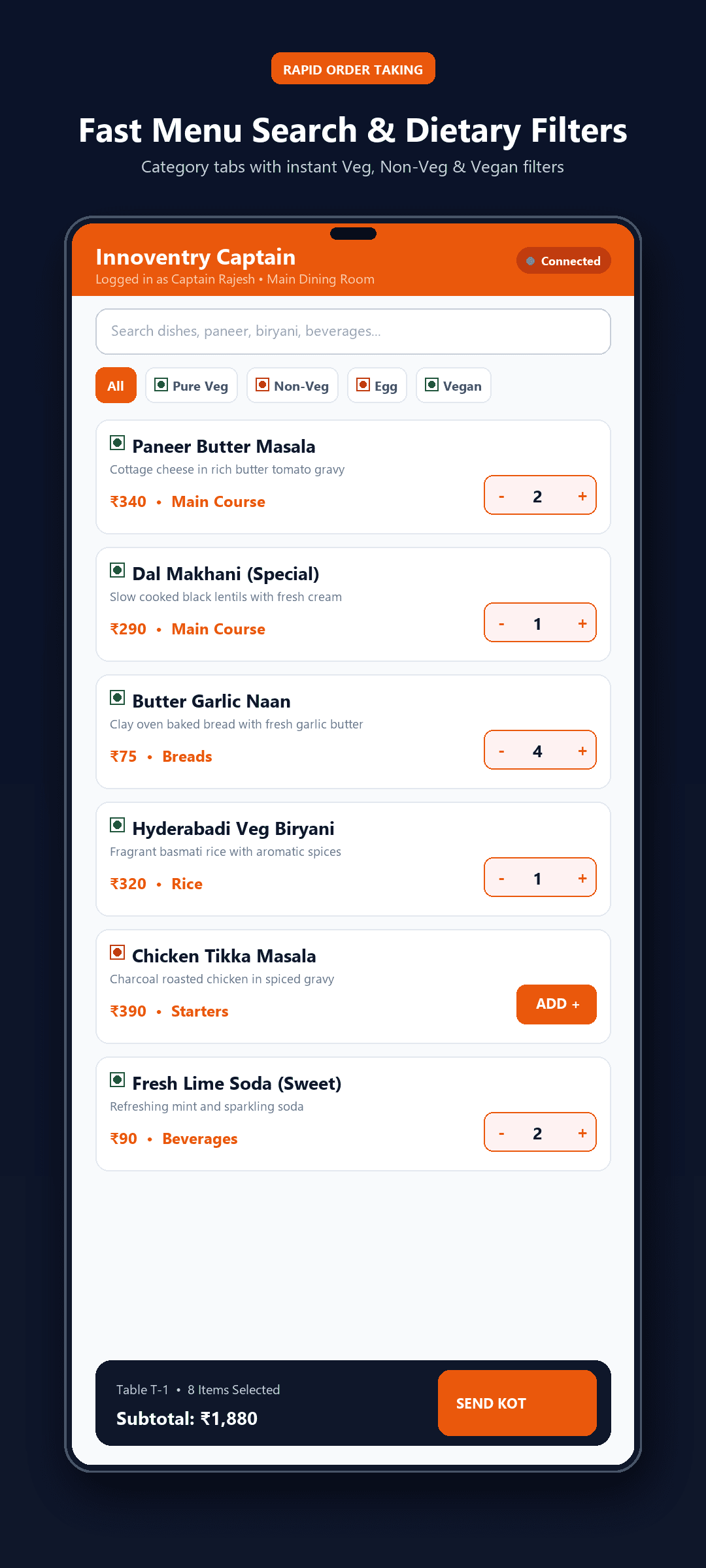
Menu Ordering Screen

Rapid Menu Ordering with Dietary Filter Chips & Dynamic Tier Pricing

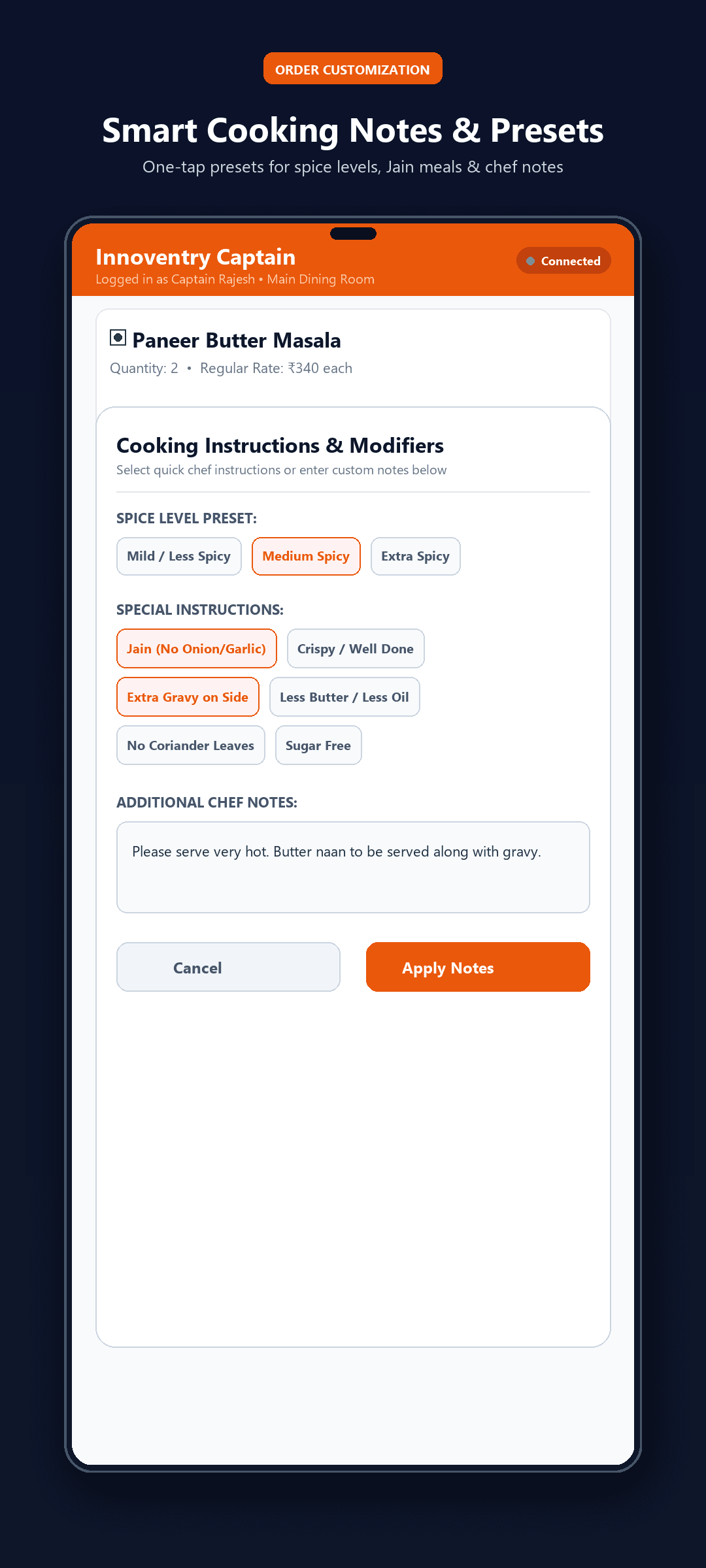
Cooking Notes & Modifiers Modal

One-Tap Cooking Modifiers (Jain, Spice Levels, Custom Preparation Notes)

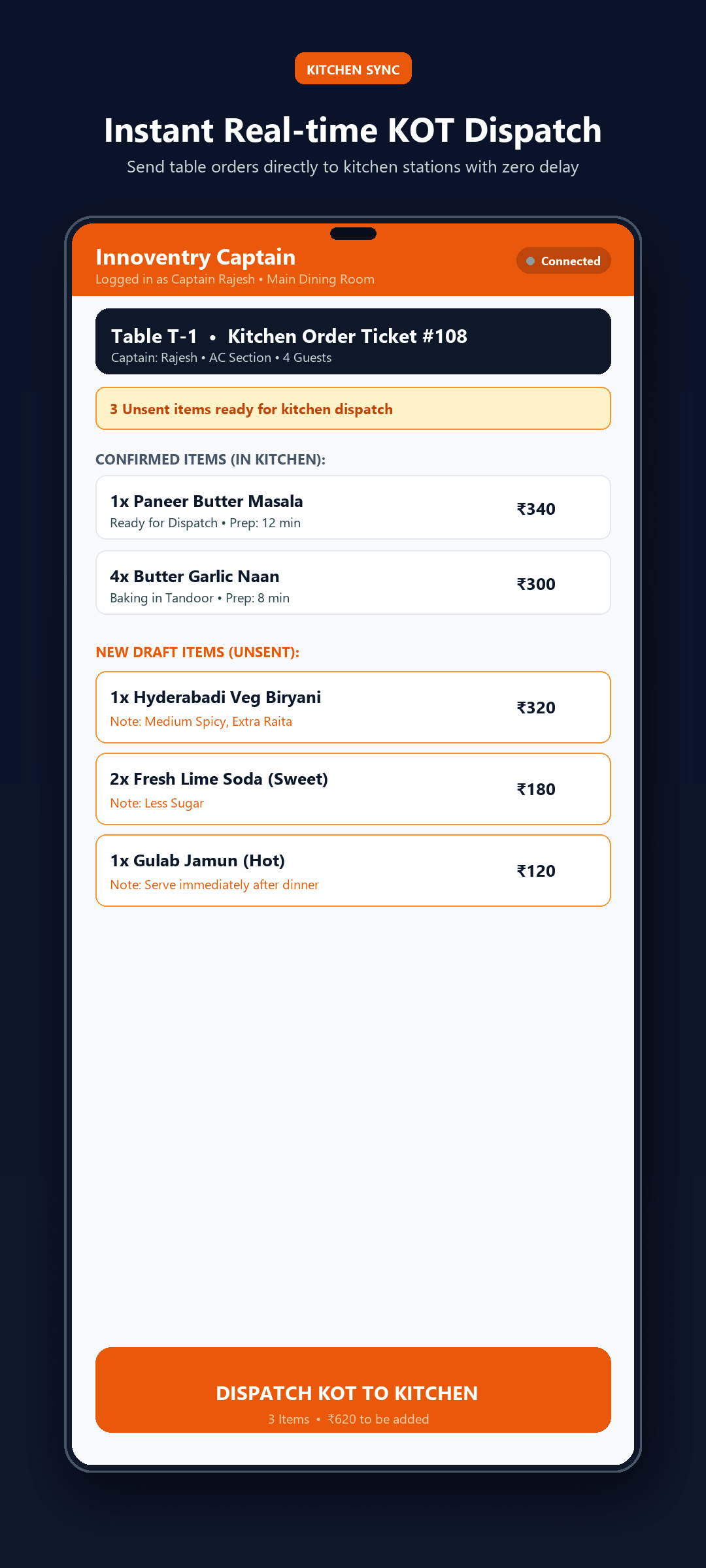
Kitchen Order Ticket Dispatch

KOT Management with Multi-Station Thermal Printer Routing

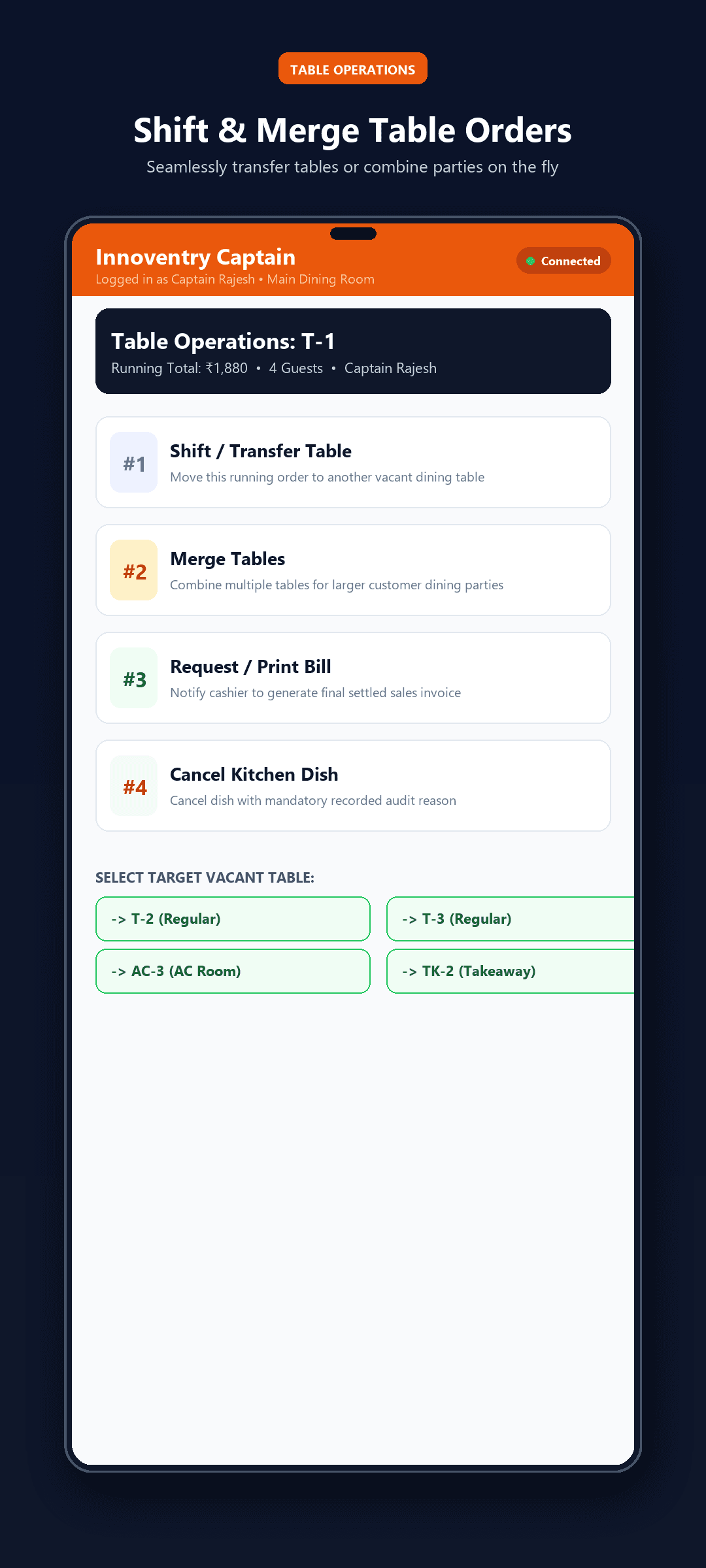
Table Shift and Merge Operations

Table Operations: Shift Running Orders or Merge Tables for Groups

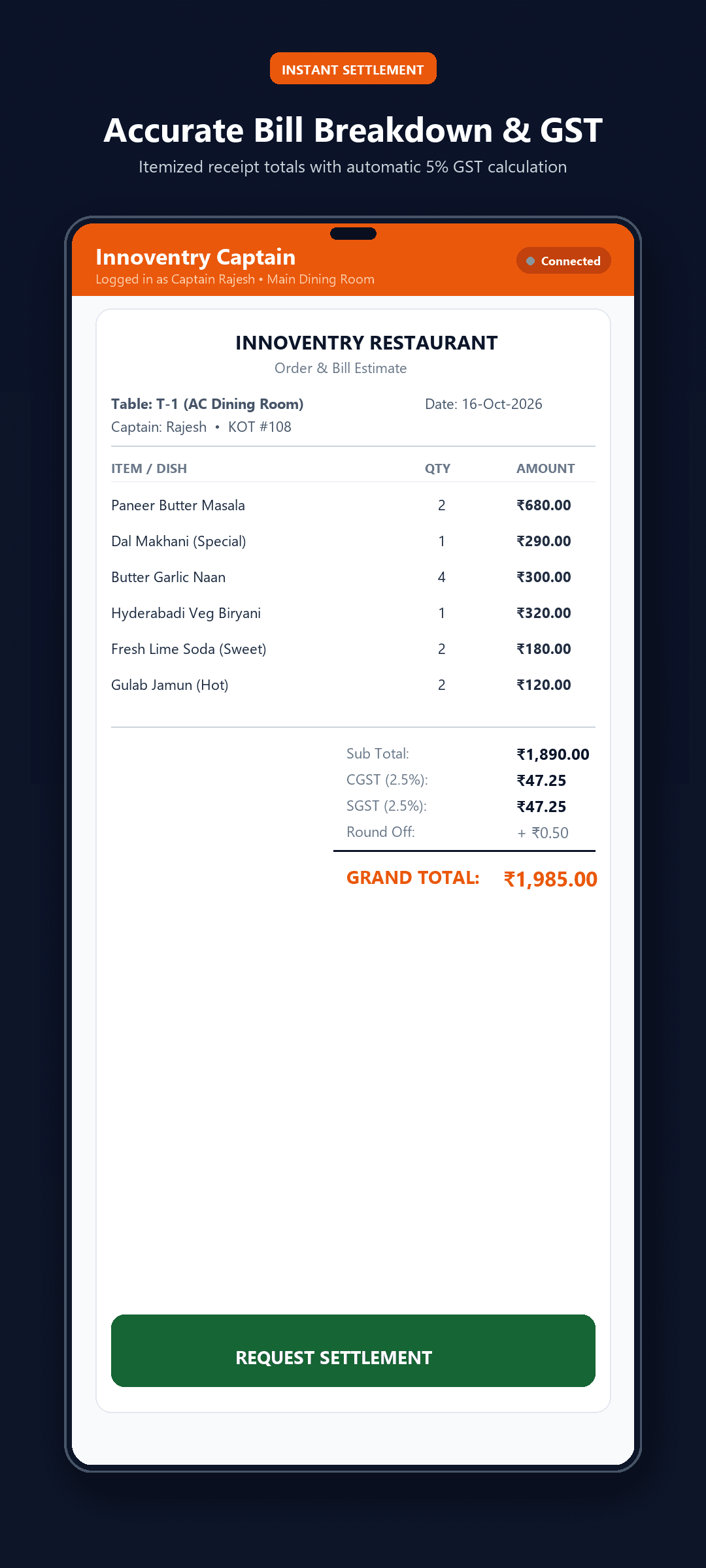
Bill Preview Screen

Itemized Bill Preview with Automatic GST & Counter Cashier Custody Guard

Core Capabilities & Features

Interactive Floor & Table Management

Visual Multi-Zone Floor Plans

Browse dining zones seamlessly: AC Family Dining, Non-AC Hall, Garden, Terrace, and Takeaway counters.

Live Table Status Indicators

Color-coded table cards display real-time statuses (Available in green, Running KOT in amber, Billed in blue) with guest seat counts and dining timers.

Table Transfers & Merging

Shift active running orders from Table A to Table B, or merge multiple tables for banquets and large parties without losing any item lines.

Local Wi-Fi Network Mode

Captains can take orders and fire KOTs over the restaurant local Wi-Fi router even when internet broadband is temporarily down.

Dynamic Pricing & Smart Menu

3-Tier Section Pricing

Regular tables get standard selling rates; AC rooms automatically apply AC tier rates; Takeaway orders inherit takeaway pricing with zero manual waiter input.

Dietary Filter Chips

Filter menu instantly by dietary preferences: 100% Pure Veg (🟢), Non-Veg (🔴), Egg (🟡), Vegan (🍃), or Chef Specials (⭐).

Cooking Notes & Modifiers

One-tap presets for cooking instructions: Less Spicy, Jain (No Onion/Garlic), Extra Crispy, Butter on Side, Sugar Free, plus custom allergy notes.

Instant Dish Search

Search items in milliseconds by dish name, short code, or kitchen category during busy rush hours.

Kitchen KOT & Revenue Protection

Real-Time KOT Dispatch

Separate unsent draft items from confirmed kitchen orders. Tapping "Send to Kitchen" immediately triggers thermal kitchen printers and KDS displays.

Mandatory-Reason Cancellation Audit

Protects owner revenue against unauthorized bill voids. Once sent to kitchen, cancellations require a mandatory logged reason.

Itemized Bill Preview

Captains can display an itemized bill breakdown with exact GST calculation (CGST 2.5% + SGST 2.5% = 5%) directly to guests.

Cashier Cash Custody Guard

Waiters can punch orders and print previews, but cash collection and final settlement are restricted to the counter cashier to prevent pilferage.

How to Get Started

1

Connect to Restaurant Wi-Fi

Connect the captain Android mobile device to the restaurant local Wi-Fi network.

2

Select Table & Punch Order

Tap any green available table, add items with cooking modifiers, and review the draft cart.

3

One-Tap Send to Kitchen

Tap "Send to Kitchen" (KOT) — tickets print at kitchen prep stations instantly while table changes to amber.

4

Preview Bill & Counter Settlement

When guests finish, show the bill preview; cashier at the central desktop settles the payment.

Innoventry Outstandings Icon
Executive Snapshot Appin.innoventry.app.outstanding

Innoventry Outstandings

Instant Read-Only Financial Snapshot & Stock Checker via QR Code

About This Application

Innoventry Outstandings is the ultra-fast, read-only snapshot companion app for Innoventry Desktop. Designed for business owners, traveling entrepreneurs, and field sales executives who need up-to-the-minute visibility into pending receivables, customer ledgers, and inventory without exposing database write access or configuring complex cloud servers.

Best Suited For:Business owners, managing directors, field sales agents, recovery executives, and auditors

Key Highlights

  • Zero-Setup QR Code Transfer (Direct Desktop-to-Phone Sync)
  • 100% Read-Only Security (Zero Risk of Accidental Ledger Edits)
  • Debtor & Creditor Aging Analysis with Contact Info
  • Instant Warehouse Stock & Item Availability Lookup
  • Works Completely Offline Anywhere Once Scanned

App Screenshots & Workflows

3 Screens
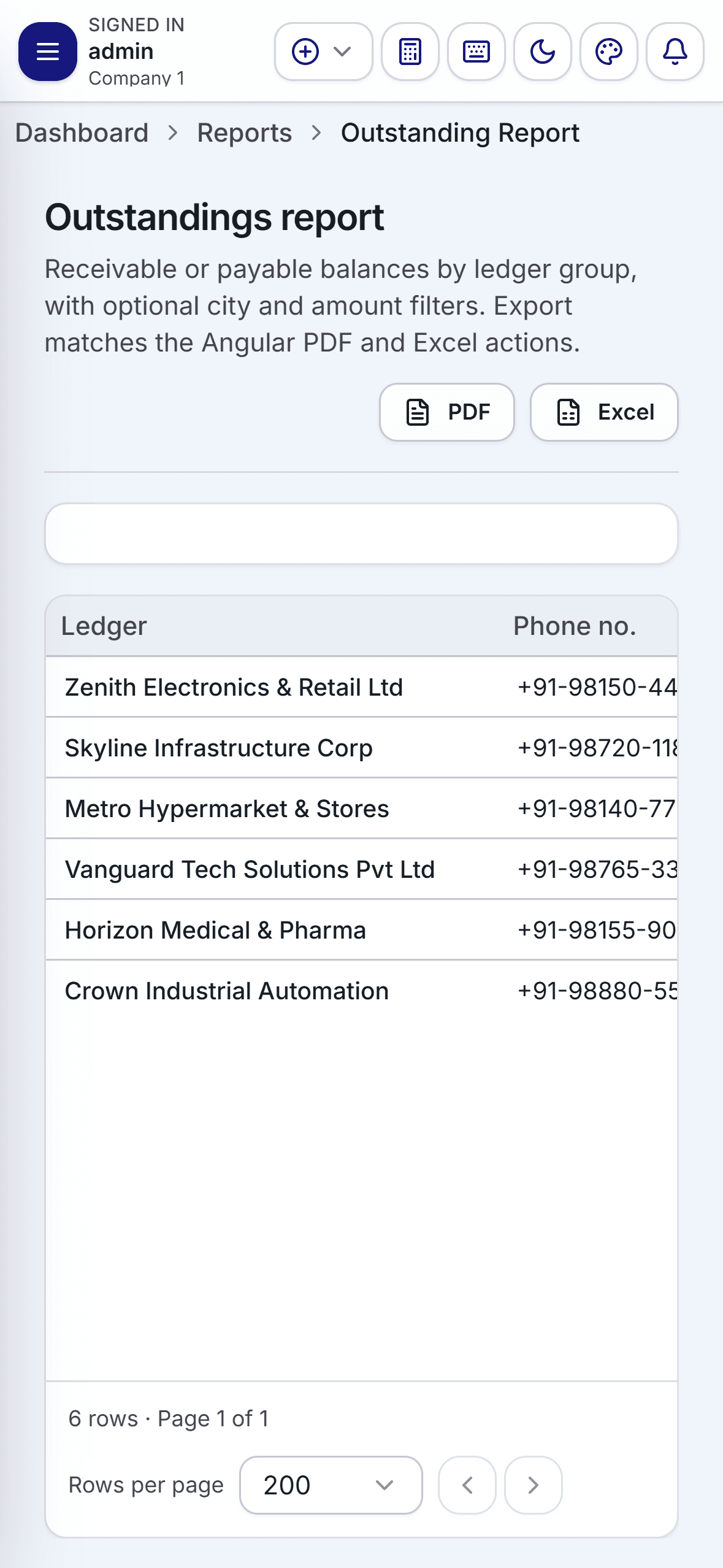
Innoventry Outstandings Report

Party-Wise Receivables & Payables Aging Report with Instant Search

Financial Snapshot View

Quick Financial Snapshot with Total Receivables & Godown Stock Status

Stock Availability Checker

On-The-Go Stock & Item Availability Lookup for Field Sales Meetings

Core Capabilities & Features

Zero-Friction QR Data Transfer

Scan & Go in 3 Seconds

Generate a snapshot QR code on your Innoventry Desktop ERP and scan it with the mobile app. All debtor outstandings and stock data transfer instantly.

No Cloud Setup or Server Needed

Operate without maintaining costly cloud infrastructure, open ports, or remote database credentials.

100% Offline Capability

Once the snapshot is scanned, data resides encrypted on your mobile device. View reports in client basements, rural visits, or on flights with zero internet.

Regular Snapshot Refresh

Before leaving the office or starting morning client rounds, scan a fresh QR code in seconds to load today’s updated balances.

Receivables & Payment Collection

Party-Wise Outstanding Balances

Inspect total receivables, individual party credit balances, and pending overdue amounts sorted by highest dues.

Aging Analysis (0-30, 31-60, 60+ Days)

Identify overdue invoices immediately with color-coded aging buckets to prioritize recovery efforts.

Direct Call & WhatsApp Action

Tap any customer name to call them directly or send a polite payment reminder via WhatsApp right from the ledger screen.

Historical Statement of Accounts

Review itemized transaction history and previous payments during customer meetings to resolve payment disputes on the spot.

Stock Availability & Executive Peace of Mind

Mobile Stock Inquiries

Check live inventory balances across products and warehouses before committing to client delivery deadlines during sales meetings.

Read-Only Safety Guarantee

Ideal for handing to collection agents or field reps—they can view who owes what and verify stock without any possibility of altering financial vouchers.

Creditor Payables Tracking

Track upcoming supplier payments, vendor balances, and procurement commitments to manage business cash flow effectively.

Minimal Battery & Storage Footprint

Ultra-lightweight footprint optimized for fast opening, low memory consumption, and instant search response.

How to Get Started

1

Generate QR Code on Desktop

In your Innoventry Desktop ERP, open the Outstandings or Stock Snapshot module and click "Generate Mobile QR".

2

Scan with Innoventry Outstandings

Open the Outstandings mobile app and point your phone camera at the QR code on your PC monitor.

3

Access Anywhere 100% Offline

Your pending balances, debtor ledgers, and stock levels are ready for instant offline review during field visits.

Desktop Company Activation Add-On

Company Activation: Export Data for Offline Mobile Access — ₹500 (+ 18% GST)

To export encrypted QR snapshots of party balances, debtor/creditor aging (0-30, 31-60+ days), and stock-in-hand from Innoventry Desktop to this app, activate the offline mobile export add-on on your desktop company database.

Connected Architecture

How Innoventry Mobile & Desktop Connect

Built with multi-tier synchronization so your business stays resilient whether connected to high-speed internet, local Wi-Fi, or running completely offline.

1. Real-Time Cloud Sync

The Primary ERP App communicates with your Innoventry Cloud database over secure HTTPS. Invoices created in the field reflect instantly on your back-office accounting computers.

Active for: Primary Mobile ERP

2. Local LAN / Wi-Fi Sync

The Restaurant Captain App operates over your restaurant’s internal Wi-Fi. Order punches and kitchen KOT tickets print in under a second even during internet broadband outages.

Active for: Innoventry Restaurant

3. Air-Gapped QR Snapshot

The Outstandings App uses computer-screen QR code scanning. No server configuration, passwords, or open internet ports required. Completely air-gapped and safe.

Active for: Innoventry Outstandings

Which Mobile App Do You Need?

Quickly compare key characteristics and operational capabilities across all three applications.

Feature / AttributePrimary ERP AppRestaurant CaptainOutstandings Snapshot
Target UserSME Owners, Traders & RetailersWaitstaff & Restaurant CaptainsField Executives & Business Owners
Sync MechanismCloud REST API + Local cacheLocal Restaurant Wi-Fi / LANDesktop QR Code scan
Data Security / EditingRole-based user permissionsLocked Cash Custody (No cash handling)100% Read-Only (Tamper-proof)
Create GST Invoices✓ Yes, Full InvoicingPreview bill only (settled at cashier)— Read-only
KOT Kitchen Ticket Dispatch— Not applicable✓ Instant Thermal KOT— Not applicable
Debtor Balances & Aging✓ Live in Ledgers— Not applicable✓ Instant Aging (0-30, 31-60+)
Live Stock Checking✓ Full multi-godown stockMenu item availability✓ Scanned stock snapshot
Offline OperationOffline billing queue✓ Operates on local Wi-Fi router✓ 100% Offline anywhere
License / ActivationIncluded with Active PlanIncluded with Restaurant Module
Free App + ₹500 Company Add-OnBuy Desktop Activation →
Google Play StoreInstall App →Install App →Install App →

Frequently Asked Questions

Answers to common inquiries regarding Innoventry mobile applications and synchronization.

Do I need an add-on or license to use the Innoventry Outstandings app?

The "Innoventry Outstandings" Android mobile app is 100% free to download and install from the Google Play Store. To enable your Innoventry Desktop ERP company to export encrypted QR snapshots (debtor balances, aging, and inventory), you need the "Company Activation Add-On: Export Data for Offline Mobile Access" (₹500 + 18% GST). Once activated for a company database, you can generate and scan QR snapshots without any limits or ongoing cloud subscription.

How do the 3 Innoventry mobile apps differ from each other?

Each app is purpose-built for a specific operational role: 1) "Billing, Accounting, Inventory" is the comprehensive primary ERP app for business owners and retailers to bill, account, manage stock, and sync with desktop/cloud. 2) "Innoventry Restaurant" is designed for captains and waitstaff to take table orders, dispatch KOTs to kitchen printers, and preview bills while locking cash settlements to the counter. 3) "Innoventry Outstandings" is a lightweight, read-only snapshot companion that lets owners and sales reps scan a QR code from the desktop to view debtor balances and stock availability offline.

Do the mobile apps work when internet connectivity is offline or unstable?

Yes! All 3 apps are engineered with offline resilience in mind. The Outstandings app stores its scanned snapshot locally so you can view balances in remote areas or basements with zero connection. The Restaurant Captain app communicates over your restaurant local Wi-Fi router directly to your counter computer and kitchen printers without requiring external internet. The Primary ERP app supports offline billing and queue sync when reconnected.

Are the mobile apps available for Android and iOS?

Currently, all 3 applications are officially published and maintained on the Google Play Store for Android smartphones and tablets (Android 7.0 Nougat up to Android 15/16). iOS native versions and responsive browser web clients are also accessible for multi-platform teams.

How does data synchronize between Windows Desktop and Android Mobile?

Innoventry offers flexible synchronization models to match your business setup: 1) Real-Time Cloud Sync connects desktop and mobile over secure HTTPS REST endpoints. 2) Local Area Network (LAN / Wi-Fi) mode synchronizes devices instantly inside your store or restaurant without relying on the internet. 3) The QR Code Snapshot mode in the Outstandings app transfers data instantly from screen to camera without requiring network pairing.

Can my sales staff or waitstaff accidentally tamper with my accounting data?

No. Role-based access control and deliberate architectural safeguards prevent data tampering. The Outstandings app is 100% read-only. The Restaurant Captain app enforces strict Cash Custody Guard—captains can take orders and preview bills, but cash collections and discount authorizations are strictly locked to the central counter cashier. In the Primary ERP app, user roles restrict who can view profit/loss or delete vouchers.

Where can I download the mobile apps?

All 3 apps can be downloaded directly from the official Google Play Store: 1) "Billing, Accounting, Inventory" (id: in.innoventry.app.innoventry), 2) "Innoventry Restaurant" (id: in.innoventry.app.restaurant), and 3) "Innoventry Outstandings" (id: in.innoventry.app.outstanding). Links are available on this page and on our Downloads page.

Ready to Upgrade Your Business Workflow?

Download our mobile apps from Google Play Store or start your 15-day free trial on Windows desktop with zero credit card required.